













Regular reminders help caregivers reduce stress
While caring for your older adult, you may encounter stressful situations, annoyances, and arguments regularly.
One way to reduce caregiving stress and the physical damage it causes is to regularly remind yourself of what’s important, let go of negativity, or take a brief time-out.
But how can you remember to take moments to de-stress when every day is so hectic?
We found a simple, fast, and free solution: use the smartphone alarm already at your fingertips.
Using your smartphone alarm to remind yourself to breathe, relax, or think about an inspiring quote is an effective way to reduce stress and improve health.
We walk through how to set up simple de-stressing alerts on your smartphone and share suggestions that we’ve found helpful.
Your smartphone is your de-stressing buddy
The alarm function on your smartphone can help you remember to take much-needed moments for yourself.
All it takes is a one-time setup of recurring alarm reminders with calming or inspirational phrases.
When you set these alarms to repeat daily, they’ll automatically go off each day.
Even if you dismiss the alarm when it goes off, it will still appear at the same time the next day.
How to set up recurring reminders on your iPhone
On your iPhone, open the Clock app and make sure you’re on the “Alarm” tab at the bottom. Then, tap the plus button in the upper-right corner to set up a new reminder.
For Android smartphones, click here for instructions on how to set up alarms.
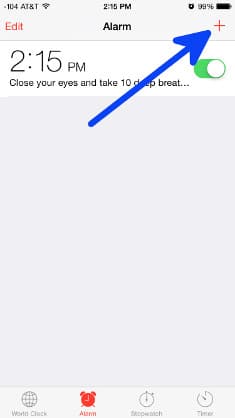
Tap the plus sign to create a new alarm
Next, choose a time of day, then select “Repeat” in the menu below the time selection.

Choose your new alarm’s settings on this screen
In the Repeat screen, choose the days you want this alarm to be active. We decided to have this alarm repeat every day of the week.

Tap each day to select. The checkmark means it’s selected.
After selecting when the alarm should repeat, tap “Back” to save your Repeat days and return to the Alarm settings screen.
Then, select “Label” to enter your relaxing or inspirational phrase. This phrase will show up on your phone’s screen when the alarm goes off.

Our reminder is “Close your eyes and take 10 deep breaths.”
Now, tap “Back” to save your Label and go back to the Alarm settings screen.
Next, select “Sound” to set the alarm to a gentle, soothing tone rather than an unpleasant blare. We like the Harp sound.

Choose a relaxing or pleasant sound
The last (and most important) step is to save the new alarm you’ve created. Tap “Save” in the upper right corner.

Save your new alarm
That's it! Your new alarm will alert you to take a moment to breathe and release tension from your body. Even a tiny break like this can reduce stress and improve health.

Our alarm in action
Set Multiple Alarms Throughout the Day
You can set up as many alarms as you’d like throughout the day.
In the morning, we like to start the day on a positive note with an inspirational quote.
Our midday reminder helps us breathe and relax.
Ultimately, the reminder helps us reflect on what we’re grateful for.
Recommended for you:
- 5 Top Mobile Apps for Caregiver Stress Relief
- 4 Ways to Reduce Stress from Caregiver Emotions
- 9 Top Caregiver Support Books for Stress Relief
About the Author

Connie is the founder of DailyCaring.com and was a hands-on caregiver for her grandmother for 20 years. (Grandma made it to 101 years old!) She knows how challenging, overwhelming, and all-consuming caring for an older adult can be. She also understands the importance of support, especially in the form of practical solutions, valuable resources, and self-care tips.


Great idea! I set my alarm(s) hourly during the day to remind me to stand up – I get so involved in projects I can sit for hours without getting up 🙂 I set up my 93 year old Mom’s to do the same and get her up hourly as well. We both laugh and make it a positive thing – we know how bad it is to sit for hours at a time. I put a Christmas song on the alarm for this time of year. It really helps.
That’s a wonderful way to use the alarm! And a great way to add laughter and fun to your day 🙂
Things are becoming very intense with my mother who has been living in my house for five months, waiting for an apartment. She is often nasty, threatening and seems to be thinking I am in it for her money. My blood pressure is causing concern with my doctor and her behavior is taking a turn, expressing that she wants to call the police. Need some advice on how to handle this.
We’re so sorry to hear about what’s been happening with your mother. To protect your own health, you may want to look into a short-term stay in assisted living so she can move out of your house while she waits for her apartment.
It’s also possible that she’s experiencing cognitive issues that are affecting her behavior due to a treatable condition (since this has started recently). These articles have more info:
– 7 Treatable Health Conditions with Dementia-Like Symptoms https://dailycaring.com/7-treatable-health-conditions-with-symptoms-similar-to-dementia/
– 8 Treatable Diseases That Mimic Dementia https://dailycaring.com/8-treatable-diseases-that-mimic-dementia/
I use my phone to remind me of my caregiving tasks, especially if it will be an overwhelming day. It helps me keep things organized and right on schedule. That way my time is “clean” and I’m aware of the available time when to relax my mind and body.
That’s a great tip! Thank you for sharing 🙂
Thanks, I use my phone alarm for when it’s time for meds. My husband takes several different kinds throughout the day. That is beyond helpful for us. No forgetting! I did not know I could change the alarm sound. That’s next. Thanks for all your helpful tips during a difficult time for both of us.
I’m so glad to hear that these tips are helpful! I hope you enjoy the new alarm sounds and that the gentle reminders help you take a moment to breathe and relax. You’ve got a lot to manage with all the medications and caregiving in general. Big hugs!
This is an interesting idea to help manage caregiver stress! Who would’ve thought it’d be so easy to set up something like this. What would you recommend to professional caregivers who need to de-stress from a long day at work?
Hi Peter,
Thanks for your comment! It’s true that professional caregivers feel the negative effects of caregiver stress as well. The job is very similar, just without the family dynamics and emotional baggage. I think professional caregivers will get the same benefit from taking a quick breather. It will reduce frustrations or stress they’re feeling, which is good for their client and keep the caregiver healthier at the same time.