













When we first featured the GrandPad for seniors in 2018, it was a specialized tool for a niche market. Fast-forward to 2026, and it has become the “gold standard” for families navigating the challenges of aging.
*Daily Caring may receive commissions for purchases made through links in this article.
As social isolation among older adults remains a global public health priority, the need for “frictionless” technology has never been greater.
Recent 2026 surveys show that 1 in 3 older adults still experience significant loneliness, a number that has failed to drop to pre-pandemic levels. For those living with dementia or physical limitations, standard tablets often create more frustration than connection.
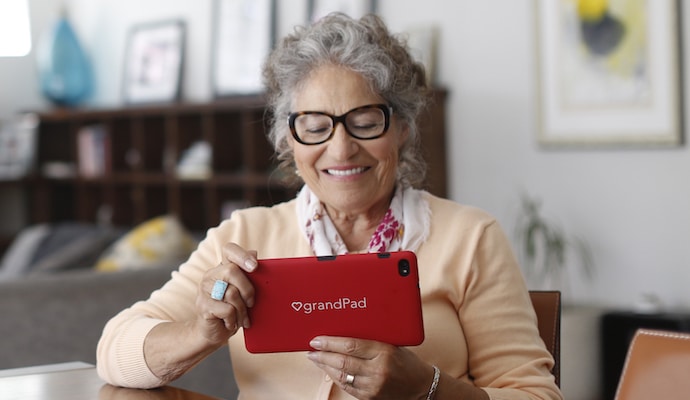
Why Simplicity in AgeTech is More Relevant Than Ever
Modern technology has become increasingly complex, with passwords, multi-factor authentication, and constant software updates that can baffle even the most patient adult.
For an aging adult with declining vision, hearing loss, or cognitive challenges like Alzheimer's or dementia, a standard iPad can quickly become a source of frustration rather than a connection.
The GrandPad for seniors solves this by staying focused on the human connection.

Key Features of the GrandPad for Seniors in 2026
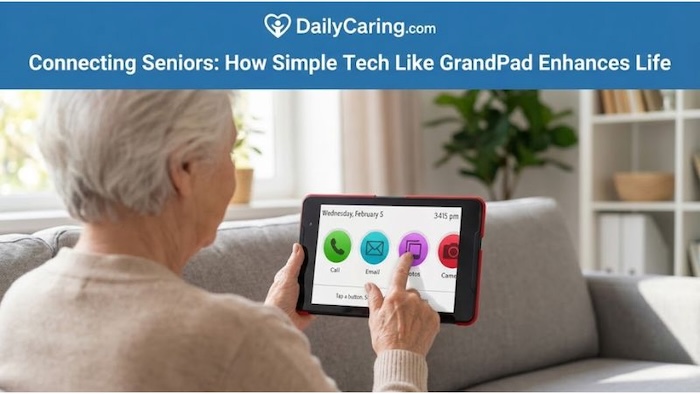
Traditional tablets (like the iPad) seem designed for a 20-year-old’s dexterity and memory. They require passwords, software updates, and knowledge of the Apple ecosystem to operate at peak efficiency. The GrandPad removes these barriers entirely:
- Scam-Proof “Family Circle”: In an era when AI-generated voice scams target seniors at record rates, GrandPad’s “closed-loop” system allows only pre-approved contacts to call or message.
- Grandie AI Companion: New for 2026, the Grandie virtual assistant (the friendly blue owl) provides cognitive engagement by playing games, telling jokes, and answering questions—offering a sense of presence even when family members are busy.
- Adaptive Hardware: The device is built for older hands, featuring a wireless charging cradle to eliminate fumbling with tiny USB cords and a stylus for those with tremors or dry skin.
- Built-in 4G LTE: Over 60% of seniors over 75 do not have home Wi-Fi. The GrandPad for seniors works out of the box using a secure cellular connection, making it ideal for rural areas or nursing homes.
The GrandPad for Seniors: A Research-Backed Solution
It’s not just about the gadgets; it’s about the health outcomes. Clinical trials in 2026 have shown that regular use of simple tablets like the GrandPad can lift mood and enhance feelings of connection, specifically for homebound seniors.
For caregivers, the GrandPad Companion App acts as a remote dashboard. You can upload photos, manage contacts, and even check whether the device is in use, giving you peace of mind without being intrusive.

GrandPad Pricing & Feature Comparison
2026 GrandPad Subscription Tiers
| Plan Level | Connectivity | Top Features | Monthly Cost |
|---|---|---|---|
| Basic | Wi-Fi Only | Video calls, photo sharing, Grandie AI | $25/mo |
| Premium | 3GB 4G LTE | Voice calling, 9-1-1 access, dedicated phone # | $45/mo |
| Ultimate | 10GB 4G LTE | VIP Onboarding, Priority Support, Check-ins | $65/mo |
Note: The GrandPad hardware is a one-time purchase for $349.
GrandPad Alternatives to Consider in 2026
1. Claris Companion: The Health Monitoring Specialist
While the GrandPad focuses on connection, the Claris Companion is designed for remote care and health monitoring.
- Remote Care Integration: It is frequently used by healthcare providers and social agencies to deliver telehealth and remote patient monitoring services.
- Health Tracking: It provides a platform for managing chronic conditions, ensuring homebound seniors remain connected to their care teams.
- Logistical Support: The company often manages the device logistics, including direct shipping and refurbishment, which can be an advantage for busy clinical staff or families.
2. The Apple iPad in “Senior Mode” (aka Assistive Access)
The “senior mode” often mentioned is actually a native iPad feature called Assistive Access. It is a distinctive experience that lightens the cognitive load by providing a simplified user interface with focused features.
- Highly Simplified: It uses a high-contrast interface with large icons and buttons, making navigation easier for those with cognitive impairments or limited manual dexterity.
- Focused Design: Apps are optimized for simplicity, offering visual alternatives to text and essential buttons, such as a dedicated “Back” button to prevent users from getting lost in complex menus.
- Supporter Managed: It requires a trusted family member or caregiver to set it up and personalize it, ensuring the user only sees the apps and features they need.
3. The Amazon Fire HD 10: A Strong Budget Contender
- Lowest Price Point: At approximately $130–$150, it is significantly more affordable than the iPad or GrandPad.
- Hands-Free Alexa: The built-in voice assistant is a game-changer for seniors with arthritis or tremors who struggle with touchscreens. They can ask Alexa to make calls, play music, or open apps without lifting a finger.
- “Show Mode”: This feature lets the tablet act like an Echo Show, turning it into a digital photo frame or smart hub while charging.
- Vibrant 10.1-inch Screen: The full HD display is sharp and large enough to reduce eye strain for reading or video calls.
If cost is the primary barrier, the Amazon Fire HD 10 is the most affordable way to get a high-quality screen into a senior's hands. Its standout feature is hands-free Alexa, allowing users to navigate the device entirely by voice – perfect for those with limited dexterity. While it requires a bit more setup by a family member to ‘de-clutter' the home screen, it offers incredible value for simple video calling, reading, and entertainment.
How Does GrandPad for Seniors Compare?
Choosing the right tablet depends heavily on your loved one’s comfort level with technology and their specific health needs. While the GrandPad is our top pick for “zero-stress” connectivity, you may be considering more versatile options, such as a standard iPad or a health-focused alternative like the Claris Companion.
These data cards break down the key differences in security, support, and cost to help you decide which device will best support your family's goals for staying connected.
Key Considerations for Your Decision:
- The Learning Curve: GrandPad is designed for those with no prior computer experience, whereas an iPad requires some familiarity with apps and passwords.
- Security & Safety: If preventing senior scams is a high priority, GrandPad’s “closed network” is the most secure option available.
- Health Monitoring: For families who need integrated medication reminders or emergency alerts, the Claris Companion offers specialized health-tracking features that standard tablets lack.
- Budget: While an iPad has no monthly fee, it requires family members to act as the “tech support” team. The GrandPad’s subscription includes 24/7 live assistance, which often justifies the cost for busy caregivers.
How to Choose the Right Device for Your Loved One
When deciding between these four options, consider these three critical questions:
- What is their current tech comfort level? If they have never used a computer or struggle with basic navigation, the GrandPad is the only “zero-training” option. If they already own an iPhone, the iPad with Assistive Access is a natural transition.
- Who will handle the “IT Support”? (In my family, tech support usually falls to my son, Matthew.) The GrandPad and Claris Companion include professional support teams to handle troubleshooting. For the iPad or Amazon Fire, a family member must be available to manage updates and fix accidental changes to settings.
- Are there specific health or safety concerns? For seniors at high risk of scams, the GrandPad's closed loop is the safest bet. If you need to monitor medical vitals, such as blood pressure, remotely, the Claris Companion is the specialized choice.
The Final Verdict: Which Device Wins in 2026?
| User Profile | Recommended Device | Why It Wins |
|---|---|---|
| The Tech-Shy Senior No prior computer or tablet experience. |
GrandPad
|
The “zero-learning-curve” interface and 24/7 live concierge mean the senior is never “stuck.” 100% scam-proof. |
| The Health-Focused Senior Living with chronic conditions. |
Claris Companion
|
Syncs directly with vitals monitors and includes a dedicated emergency response button with caregiver alerts. |
| The Independent Senior Mentally active but needs focus. |
iPad Assistive Access
|
High-quality hardware with zero monthly fees. Simplifies the iPad into a high-contrast, large-button layout. |
| The Budget-Conscious Simple needs: Video calls & photos. |
Amazon Fire HD 10
|
Lowest entry cost ($130–$150). Alexa voice control helps seniors navigate without needing precise finger dexterity. |
Final Thoughts on the GrandPad for 2026 and Competitors in the Tablet Space
The GrandPad isn't just a tablet; it’s a managed service. While the monthly subscription is higher than a standard data plan, psychologically, it pays for itself by eliminating the ‘accidental 2 AM tech-support calls' to family members.
If your loved one has early-stage dementia or extreme tech-anxiety, the GrandPad’s scam-proof ‘Family Circle' and 24/7 live concierge are the best investments you can make for their social health in 2026. However, if they still have the dexterity for more complex apps, a budget Android or iPad is worth considering as a more cost-effective bridge.
Technology should never be a source of stress for a senior or their caregiver. Whether you choose the “white-glove” service of the GrandPad or the budget-friendly Amazon Fire, the goal is the same: preventing social isolation and keeping the lines of communication open.
About the Author

Chris is a seasoned healthcare executive and entrepreneur from the Pacific Northwest. He strongly advocates for older adults and the caregivers who serve them. Chris has personal experience caring for his father, who had dementia. Chris is an avid outdoorsman; if he's not in his office, he can usually be found on a golf course or in a garden out west somewhere.


What a wonderful tool! It’s amazing that technology allows us to connect with our loved ones, and overcome the loneliness caused by aging. What a blessing that is.
Yes! Helping families stay connected is a wonderful use of technology