













You spent months ensuring your loved one’s will was signed, and their executor was chosen correctly. But in 2026, there is a hidden estate that is often completely overlooked: the digital estate plan.

Think about it. Where are the family photos stored? How do you access the utility bills that are only sent via email? What happens to their Facebook memories or their Amazon subscription?
If you don't have a plan, these assets don't just disappear; they become locked doors that can take years of legal friction to open. As CPA Kurt Supe recently noted (see below), digital estate planning is the “missing piece” of modern financial freedom.
What Counts as a “Digital Asset” in 2026?
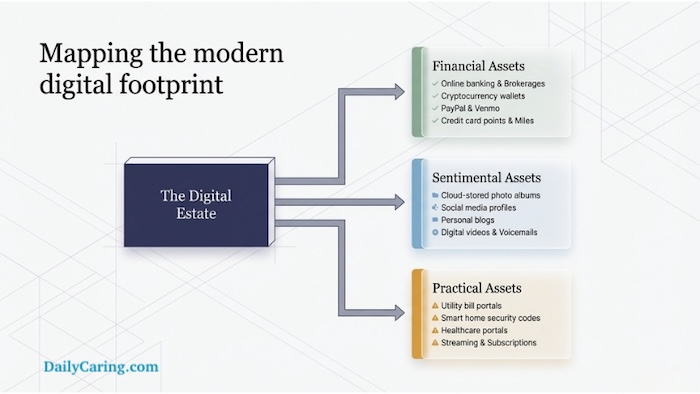
It’s more than just a Gmail password. A modern digital estate plan includes:
- Financial: Online banking, PayPal/Venmo, and Cryptocurrency wallets.
- Sentimental: Cloud-stored photos (Google/Apple), social media, and personal blogs.
- Practical: Smart home security codes, subscription services, and healthcare portals.
Make Sure You Grant Fiduciaries Explicit Access to Your Digital Life
Kurt Supe, a CPA & retirement planner, recently shared a valuable tweet on X (Twitter). He said that a 71-year-old man can do everything right: make a will, set up a Trust, and name beneficiaries, but he can still leave his family in a nightmare scenario if his entire life is locked behind a smartphone passcode.
Without a “digital estate plan,” photos, financial records, and even memories can vanish or cost thousands in legal fees to recover.
To prevent the scenario above, you need to understand the Revised Uniform Fiduciary Access to Digital Assets Act (RUFADAA). This law allows your chosen fiduciaries to manage your digital life, but only if you explicitly grant them permission in your estate documents.
Big Tech Tools to Help Manage Your Digital Assets Online
Native Legacy Tools
Set these up in 5 minutes each to bypass digital red tape
| Platform | The Solution | Setup Link |
|---|---|---|
| Inactive Account Manager Automatically notifies a trusted contact and allows them to download data after a period of inactivity. | Google Manager | |
| Apple | Legacy Contact Generates an access key that a contact uses (with a death certificate) to unlock iCloud photos and files. | Apple Legacy |
| Legacy Contact Designates a person to manage a memorialized profile or request permanent account deletion. | FB Contact |
VIDEO: Protect Your Digital Estate With Our Caregiver's Planning Guide
The Caregiver Action Plan to Secure One's Digital Legacy
You don't need to be a tech expert to secure a digital legacy. Follow these three steps to build a 2026-ready digital safety net:
Step 1: Appoint a “Digital Executor”
This doesn't have to be your primary estate executor, but they should be comfortable with technology. Their job is to follow your instructions for closing social media accounts, retrieving digital photos, and settling online-only bills.
Step 2: Update Your Power of Attorney
Don't assume a standard POA covers your smartphone. Ensure your 5 important legal documents for caregivers specifically include “digital asset” language. This grants your agent the explicit right to access and manage your electronic files and communications under RUFADAA laws.
Step 3: The Password Hand-Off
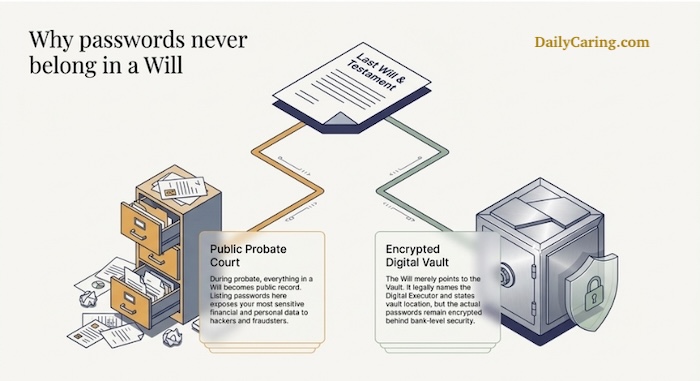
Never write passwords in a Will, as it becomes a public document. Instead:
- Use a secure Password Manager with an “Emergency Access” feature.
- Alternatively, keep a physical “Digital Vault” in a fireproof safe. This should include a master password list alongside your Living Will to ensure medical and digital wishes are kept together.
Frequently Asked Questions About Digital Estate Planning
If your digital life is locked behind a smartphone passcode without a plan, your family will face years of legal friction and thousands of dollars in fees to recover financial assets, photos, and critical accounts, even if you have a traditional will in place.
The Revised Uniform Fiduciary Access to Digital Assets Act (RUFADAA) legally allows your chosen fiduciaries to manage your digital assets, but only if you explicitly grant them permission within your formal estate documents, such as your Power of Attorney.
Never write passwords in a formal Will. A Will becomes a public document during probate court, which exposes your most sensitive financial and personal data to fraudsters. You must use a secure password manager or a fireproof physical digital vault instead.
Conclusion: Secure Your Digital Legacy Today
We spend our lives building a digital footprint; we shouldn't leave our families to navigate it in the dark. By spending just one hour today setting up legacy contacts and updating your paperwork, you’re removing a massive future burden from your loved ones.
As the Sandwich Generation knows all too well, the best gift you can give is clarity.
This information is for educational and informational purposes only and does not constitute professional legal or financial advice. Digital estate laws (like RUFADAA) vary significantly by state. We strongly recommend consulting with a qualified estate planning attorney or digital legacy expert to ensure your plan meets current legal standards in your jurisdiction.
About the Author

Chris is a seasoned healthcare executive and entrepreneur from the Pacific Northwest. He strongly advocates for older adults and the caregivers who serve them. Chris has personal experience caring for his father, who had dementia. Chris is a technology enthusiast and an avid outdoorsman; if he's not in his office, he can usually be found on a golf course or fly-fishing out west somewhere.



This is a very insightful article. As someone working closely with senior care at Shibasram, I’ve seen how often families overlook digital legacies. Managing digital assets is just as important as physical healthcare for elders today. Thanks for sharing these practical steps for caregivers!